Tag: Scheduled Messages

  • Discord Reminder: schedule automatic messages with MsgPlanner

    If you’re looking for a smart and flexible way to send a Discord reminder to your server, MsgPlanner Bot is the solution you need. Whether you’re managing a gaming community, a project team, or a content server, MsgPlanner allows you to plan announcements, alerts, or updates with absolute precision — and without lifting a finger when the time comes.

    What makes MsgPlanner different?

    Unlike generic scheduling bots, MsgPlanner was designed specifically to handle reminders and timed messages in Discord with advanced control and ease of use. Everything — from message formatting to scheduling logic — has been optimized for both casual and power users.

    You can choose between single, recurring, or calendar-based schedules. Whether it’s a weekly meeting reminder or a one-time launch announcement, MsgPlanner adapts to your needs.

    Plan discord reminders with advanced controls

    You can use the /schedule_msg slash command to create reminders directly in Discord, but the real power lies in the dedicated dashboard.

    From the web interface, you can:

    • Preview your message before it goes live
    • Fine-tune timing using an advanced cron editor, if you prefer total control
    • Quickly shift schedules for Daylight Saving Time or standard time with a single click or set it automatic (feature coming soon)
    • Manage reminders in bulk — delete or duplicate them effortlessly

    Rich message formatting and mentions

    MsgPlanner lets you craft messages that stand out. You can apply:

    • Bold, italic, underline, code blocks, quotes
    • Emoji insertion with full picker
    • Attach images or documents
    • Add Discord embeds with titles, colors, fields, footers, and thumbnails
    • And most importantly: mention roles or specific users in your scheduled messages

    This means you can notify @everyone, @staff, or even ping a single user with a timed message — just like you would in real-time, but automated.

    Multi-timezone support

    All reminders can be scheduled using your local timezone, and MsgPlanner handles the rest. This is especially useful for global communities where users span across different regions.

    Before saving, you’ll see a preview of the upcoming activations in your chosen timezone, so there’s no risk of mistakes.

    Role-based permissions

    MsgPlanner respects your server’s structure. You can choose which roles are allowed to create or edit reminders, ensuring full control over who can schedule what. This makes it ideal for servers where only moderators or event managers should manage scheduled content.

    Premium-friendly, but powerful even for free users

    MsgPlanner is designed to be accessible to everyone. Even without a subscription, your server can take advantage of generous free limits:

    • Up to 3 active discord reminders
    • 200 characters per message
    • 1 attachment per message
    • Up to 5 iterations per recurring schedule

    That’s more than enough for basic use — and perfect to explore the bot’s features.

    You can unlock more power by voting on Top.gg or activating a subscription directly on Discord.

    💎 What you get with the Elite Feature Pack

    For servers that need more control and flexibility, the Elite Feature Pack offers:

    • 🔓 Up to 120 active schedules
    • ✏️ Messages up to 4000 characters
    • 📎 Up to 10 attachments or embeds per message
    • 🔁 Unlimited repetitions for recurring messages (within fair use)

    Elite subscribers also benefit of custom branding options like bot avatar personalization. Learn all about Elite Feature Pack


    Ready to automate your server like a pro?
    MsgPlanner is the ultimate tool for Discord reminders — combining power, clarity, and control.

    👉 Try it now on your server or explore the full dashboard: https://dashboard.discordmessageplannerbot.com

    Need help with your reminders?

    If you run into any issues or just want a hand setting up your first Discord reminder, our support team is here for you. You can join the official MsgPlanner Support Server to:

    • Get step-by-step help with setting up your reminders
    • Ask questions about features or best practices
    • Report bugs or suggest improvements
    • Connect with other MsgPlanner users

    We’re always happy to help and make sure your experience is smooth and productive.

  • How to Schedule Discord Messages: Master Recurring Messages with MsgPlanner

    How to Schedule Discord Messages: Master Recurring Messages with MsgPlanner

    Recurring messages are essential for keeping your Discord server organized, whether for event reminders, announcements, or regular updates. With MsgPlanner, you can easily schedule Discord messages to repeat automatically at intervals you define. Let’s dive into the details of how MsgPlanner’s recurring scheduling works and how it simplifies server management.


    Setting Up Recurring Activations in MsgPlanner to schedule Discord messages

    If you’re familiar with sending delayed messages on Discord using MsgPlanner, you already know the basics: you provide a message, optional attachments, and a start date. With recurring schedules, you’ll also set an interval and an optional end date, giving you complete control over when and how often your messages are sent.

    The Basics of Recurring Scheduling

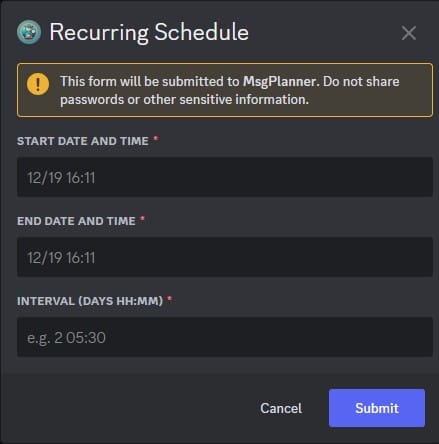
    After using the /schedule_msg command and selecting the Recurring Activation option, MsgPlanner will guide you through the following steps:

    1. Select a Channel: Choose the Discord channel where you want your messages to appear.
    2. Compose a Message: Write your message and add any attachments if needed.
    3. Define Schedule Details:
      • Start Date: The exact date and time when the first message should be sent.
      • End Date (optional): The date when the recurring schedule should stop.
      • Interval: The time between each message.

    Flexible Date Formats: The system recognizes both US (month/day) and European (day/month, day-month, day.month) formats for date, adapting to your Discord settings.


    How the Start Date and Interval Work Together

    The Start Date serves as the reference point for all subsequent messages. Every activation is calculated based on this date, ensuring precision and consistency.

    The Interval defines the gap between messages. For example:

    • To send a message every 1 hour and 30 minutes, input 0 01:30 (0 days, 1 hour, and 30 minutes).
    • This format requires:
      • A space between days and hours.
      • A colon (:) between hours and minutes.

    Important Notes:

    • The interval strictly follows the format days hours:minutes, ensuring compatibility across all time zones in the discord app, meanwhile in the dashboard we have 3 separate input for each parameter.
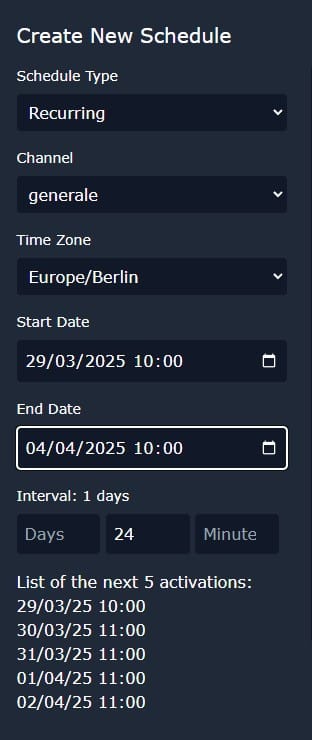
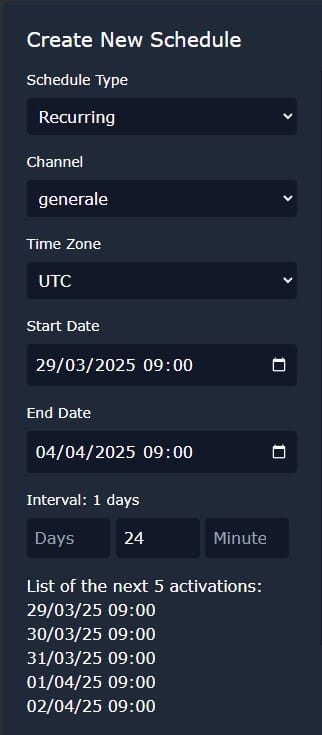
    • Keep in mind that Daylight Saving Time (DST) can affect the timing if you’re scheduling based on hours. For example:
      • A message scheduled for 24-hour intervals starting on March 29th at 10:00 (Europe/Rome) will be sent at March 30th at 11:00, maintaining a consistent 24-hour span.
      • When viewed in UTC, these activations are consistently at 09:00.

    Use the Web Dashboard for Precision Control

    MsgPlanner’s web dashboard offers a visual way to manage and monitor your recurring schedules. It calculates the next five activations for you, allowing you to verify timing and make adjustments as needed. This helps you maintain full control and ensures your messages are delivered exactly when intended.

    Key Features of the Web Dashboard:

    • Preview Scheduled Activations: See the upcoming dates and times for your recurring messages.
    • Localized Time Zones: The dashboard displays times in the list of next activations based on the Start Date and End Date settings, not the user’s local time.

    Why Use Recurring Schedules to schedule Discord messages?

    Recurring schedules in MsgPlanner are incredibly versatile. They’re perfect for creating reminders for recurring events, such as weekly meetings, regular announcements, or routine updates for your community. By automating these tasks, you can ensure consistency and free up time to focus on what really matters in managing your server.

    Whether it’s reminding your members of a monthly event or setting up daily updates, MsgPlanner’s recurring feature makes sure your messages are timely and effective. Take full advantage of this tool to keep your server running smoothly and your members engaged!

    To start schedule discord messages, access the web dashboard at https://dashboard.discordmessageplannerbot.com, and for further assistance, visit our support server: https://discord.gg/cWmx34vyxx.