
Your schedules are work. MsgPlanner treats them that way: save messages as reusable templates, export everything to a single file — images included — and import it into another server, with a dry-run preview that tells you what will happen before anything is written.
Templates, export and import live in the web dashboard; imported schedules can then be managed from inside Discord as well.
Templates: build once, reuse forever
Any message — text, embeds, attachments — can be saved as a template: up to 100 per server, managed from their own dashboard page, with search and multi-select export. Recall one into any new schedule and the whole content lands in the editor, ready to adjust. Templates carry no channel or timing: they are pure content, which is exactly what makes them reusable.
Template rotation: one schedule, many messages
Templates aren’t just for manual reuse anymore. With template rotation (Elite), a recurring or calendar schedule pulls its content from a list of templates instead of a single message: at every delivery, the next one in line goes out — in order (with a choice of starting over or ending the schedule when the list completes) or shuffled, never repeating a template until all have been sent.
Tip of the day, rotating rules reminders, weekly community spotlights, a quiz series: build the messages once as templates, put them in one schedule, and the channel gets variety on autopilot. Edits to a template flow into the rotation automatically — fix a typo once and every future delivery has it.
One file, everything inside
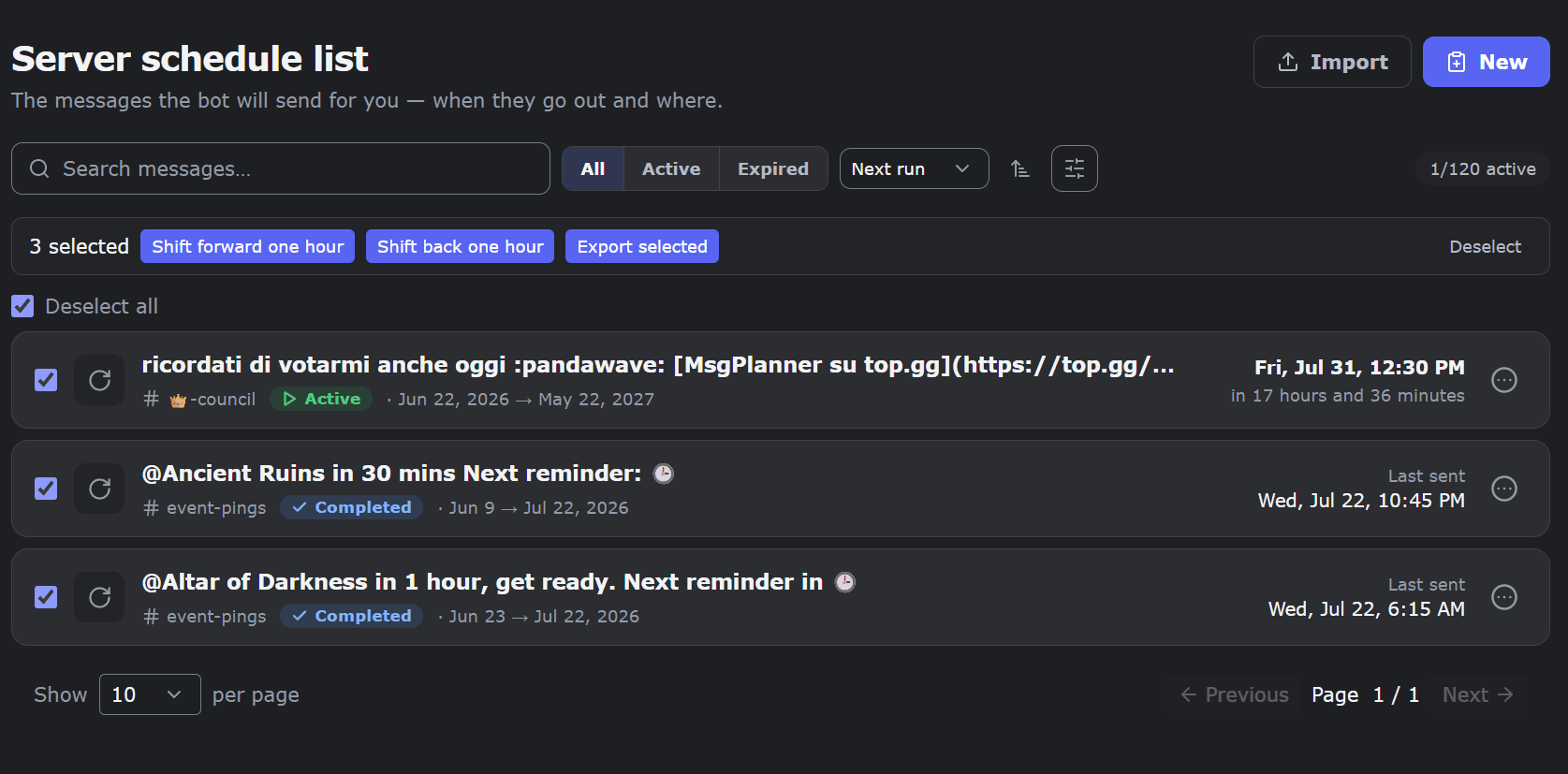
The export produces a single JSON file containing your schedules (selected ones, or the whole server), optionally all templates, and — this is the part most tools skip — the actual image files, embedded in the package. Attachments and embed images travel inside the file: the backup is complete and self-contained, not a list of links that rot.
What travels: content (message, embeds, attachments), the full schedule definition (type, dates, interval or calendar rule, timezone, DST setting), and attribution (who created it, when). What deliberately doesn’t: execution state and database IDs — an import creates fresh schedules, it doesn’t clone rows.
Exporting is free for every server. Importing is an Elite feature.
Import with a safety net
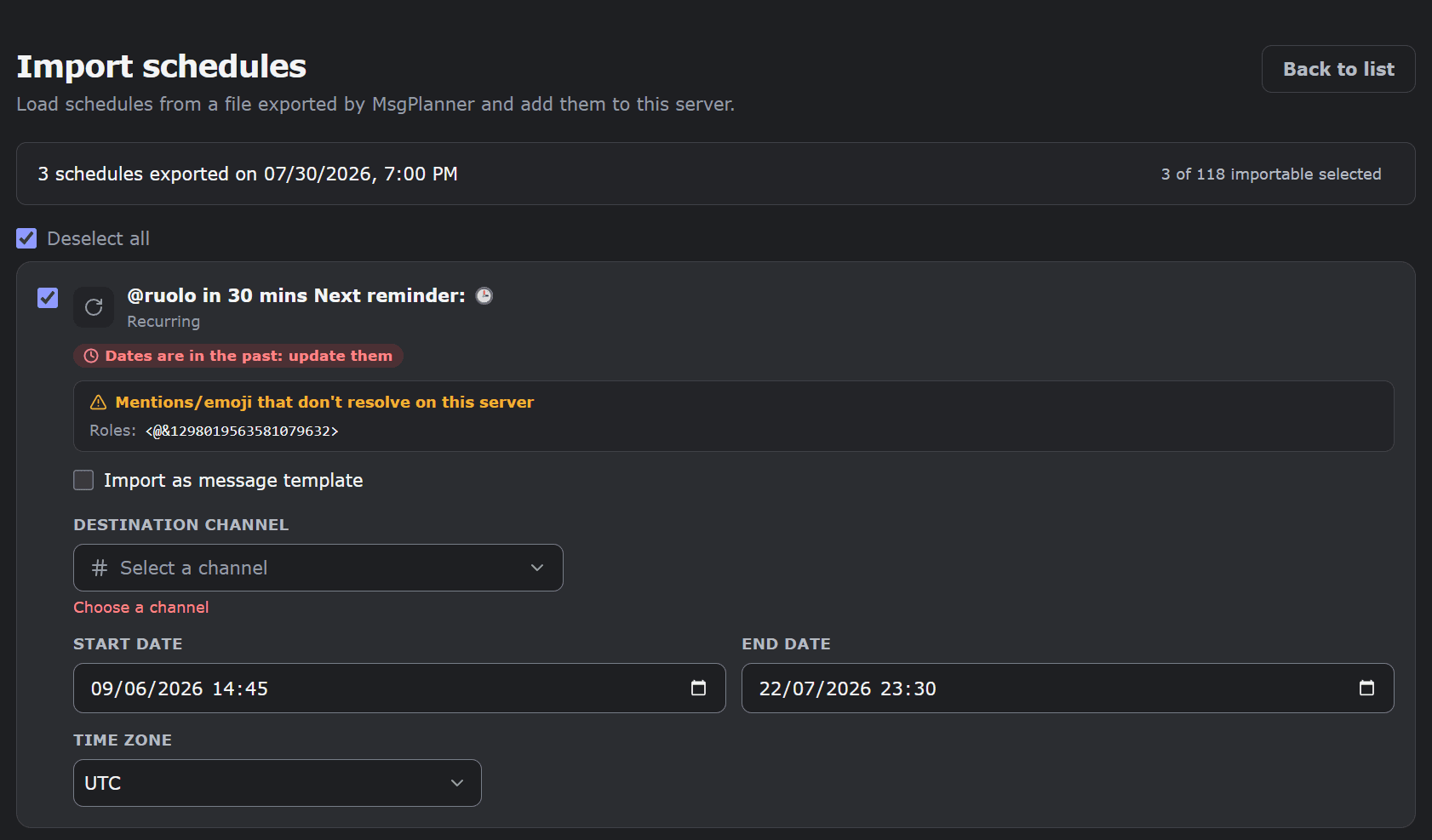
Importing runs as a dry-run first: every row is analyzed against the destination server before anything is written.
- Broken references are found for you: mentions, roles, channels and custom emojis from the old server that don’t exist in the new one are flagged row by row — reported, never silently guessed.
- Imported schedules arrive suspended, marked “to fix” where needed: you re-pick the destination channel, check the content, and resume them when you’re ready. Nothing fires by accident.
- Images are rebuilt in the destination server’s own storage, never shared across servers.
- History is preserved: the original creator stays on record; whoever imports is recorded as the updater.
- Quotas still apply — imports can never push a server past its plan limits.
Any row can also be imported as a template instead of a schedule: channel and timing are stripped, content and title are kept. Useful when the old server’s timing makes no sense in the new one.
What people use it for
- Backup before big changes — rework your announcement setup knowing you can restore it.
- Staging to production — build and test schedules in a private server, then import them into the community.
- Running multiple communities — the same weekly announcement pack, imported into each server and adjusted once.
- Content on rotation — a daily tip drawn from a pool of templates, shuffled so regulars don’t see the same one twice in a row.
FAQ
How do I back up my scheduled messages on Discord?
Export them from MsgPlanner’s dashboard: one JSON file with schedules, templates, and all images embedded. Exporting is free on every plan.
Can I transfer schedules from one server to another?
Yes — export from the source server and import into the destination (Elite). A preview flags anything that won’t resolve in the new server before the import runs.
Do images and attachments travel with the backup?
Yes. Attachment and embed images are embedded in the export file itself, and rebuilt in the destination server’s storage on import.
Do imported schedules start sending immediately?
No — they arrive suspended, with warnings on anything to fix (like channels to re-pick). You review and resume them explicitly; rows whose dates are already in the past import as archive records — give them new dates (or duplicate them) to bring them back to life.
What happens to mentions and emojis from the old server?
The import preview checks every mention, role, channel and custom emoji against the destination server and flags the ones that don’t exist there — you fix them in the editor before activating.
How many templates can a server have?
100. Each template stores content only — message, embeds, attachments — so it can be reused in any schedule.
Can a schedule rotate through several templates?
Yes — template rotation (Elite): a recurring or calendar schedule sends the next template from a list at every delivery, in order or shuffled without near repeats. Editing a template updates all rotations using it.
Do templates and backup work from the Discord app?
No — templates, export and import live in the web dashboard. Once imported, schedules can be resumed, suspended or deleted from the app as well.