
Yes — a bot can post on a schedule inside a Discord forum channel. Discord has no native way to do it, and most scheduler bots stop at text channels. MsgPlanner delivers scheduled messages into forum posts and threads just like any other destination: one-time, recurring or on a calendar, with full formatting, embeds and attachments.
Why forum channels are different
In a forum channel you never post “in the channel”: every conversation is a post, and technically each post is a thread. That is why most bots (and Discord itself) can’t schedule anything there — the message has to be delivered inside a specific post, not to the channel. MsgPlanner handles this natively: you pick the post, the bot delivers into it, on time, every time.
The same applies to regular threads in text channels: pick the thread, not just the channel, and the message lands exactly where the conversation lives.
How to schedule a message in a forum post
From the web dashboard:
- Create a schedule and open the channel selector.
- Forum channels show their posts indented right below them — pick the post (the forum itself is not a valid destination, and the selector tells you why).
- Write the message, add embeds or images, set the timing — one-time, recurring or calendar — and save. Done.
From inside Discord: run /schedule_msg, and in the channel step pick the forum post or thread directly from the channel picker.
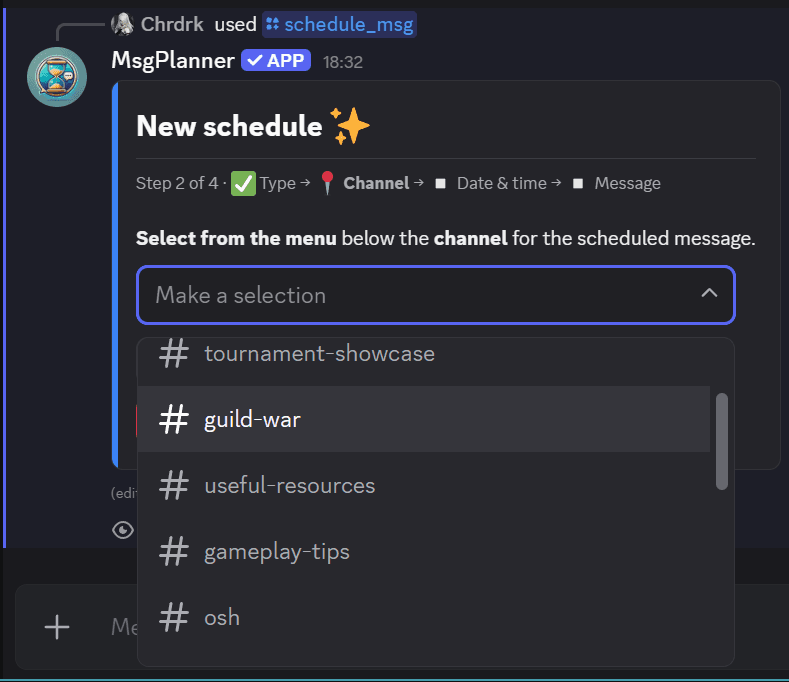
Everything MsgPlanner does elsewhere works in forum posts too: recurring and calendar schedules, timezone-aware delivery with automatic DST handling, embeds, image attachments, mentions and dynamic timestamps.
The permissions you need
For delivery into a forum post or thread, the bot needs, on that channel:
- View Channel
- Send Messages in Threads (this one — not the regular “Send Messages” — is what counts inside posts and threads)
- Manage Webhooks (MsgPlanner delivers via webhook)
- Attach Files, only if your message carries image attachments
The dashboard checks these for you: a destination the bot can’t deliver to shows up disabled, with the missing permission named. You can also run /check_permissions in Discord for a full report.
Good to know
- Only active posts are listed. Discord archives inactive posts and doesn’t expose them to bots: if your post is archived, open it once (or unarchive it) and it will appear in the selector.
- The schedule targets an existing post. Creating a brand-new forum post at delivery time isn’t supported — pick the post the message should live in.
Announcement channels: publishing included
Forum posts and threads aren’t the only destination with a twist. Scheduling into an announcement channel used to deliver the message but leave it unpublished — the servers following the channel got nothing until someone pressed “Publish” by hand. With auto-publish, MsgPlanner presses it for you: enable the toggle on the schedule and every delivery is crossposted to your followers the moment it lands. It needs the Manage Messages permission on that channel (new installs have it already; the wizard warns you if it’s missing).
No external automation tools needed
Most workarounds for this rely on generic automation platforms outside Discord: another account to manage, per-delivery costs, messages written as raw JSON with no preview, and timezones to juggle by hand. A bot that already lives in your server does it with a visual editor, a real Discord preview, embeds and mentions — and delivery included in the plan, free tier included.
FAQ
Can a bot post in a forum channel on a schedule?
Yes. MsgPlanner delivers scheduled messages inside forum posts: pick the post as the destination and schedule normally — one-time, recurring or calendar.
Can I schedule a message in a thread?
Yes. Threads work exactly like forum posts: choose the thread in the channel selector and the message is delivered inside it.
Can scheduled announcements be published to followers automatically?
Yes. With auto-publish enabled on a schedule targeting an announcement channel, every delivery is crossposted to the servers following it — no manual “Publish” needed.
Why can’t I select the forum channel itself?
Because Discord forums only accept messages inside posts. The forum appears in the selector as a header with its posts listed under it — pick one of the posts.
Why doesn’t my forum post show up in the list?
It is probably archived: Discord only exposes active posts to bots. Open the post once (or unarchive it) and it will appear.
Do I need to mention the bot in the post first?
No. MsgPlanner lists all active posts it can see — no setup message, no mention needed.
Does it work with recurring messages and embeds?
Yes: every schedule type and every content feature (embeds, attachments, mentions, dynamic timestamps) works in forum posts and threads.