
Every active Discord server runs on a schedule — stream nights, raid times, community events, weekly announcements. But Discord itself has no way to post that schedule automatically. “Integrating a schedule” into your server usually means one of three things:
- Using Discord’s built-in Events for individual happenings
- Having a bot post your schedule automatically on a recurring basis
- Syncing an external calendar (like Google Calendar) into Discord
This guide covers all three, what each is good for, and how to set up the second one — the approach that keeps a living schedule inside your channels with zero manual work.
What Discord Events can (and can’t) do
Discord’s native Events are great for single occasions: members can RSVP, get a reminder, and see the event at the top of the channel list. Their limits show up as soon as your schedule repeats:
- No recurring posts — you create each event by hand
- Nothing is posted into your channels: the schedule lives in a side panel most members never open
- No way to publish a weekly overview (“here’s what’s happening this week”) automatically
If your server’s rhythm is weekly or monthly, you need the schedule to appear where people actually read: in a text channel, on time, every time.
Posting your schedule automatically with MsgPlanner
MsgPlanner is a Discord bot built for exactly this: you write the message once, decide when it should go out, and the bot delivers it on schedule — in your server’s own timezone, configured from a web dashboard with no commands or code.
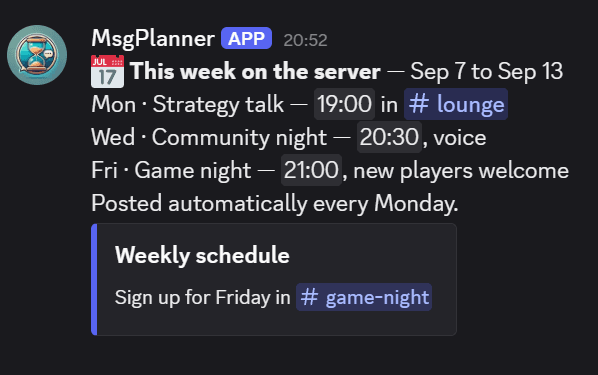
A few patterns that map directly onto “schedule integration”:
The weekly schedule post. Write your week’s lineup as one message (embeds and images supported), schedule it for every Monday at 9:00. Done — your announcement channel now has a fresh schedule every week.
“Every third Friday” and other real-world rules. Real schedules don’t follow calendar dates: the team meeting is on the first and third Friday, not “the 1st and the 15th”. MsgPlanner’s calendar mode lets you pick weeks of the month (first/second/third/fourth/last) and weekdays independently, and shows a mini-calendar preview of every future delivery up to a year ahead — so you can see the integration working before it runs.
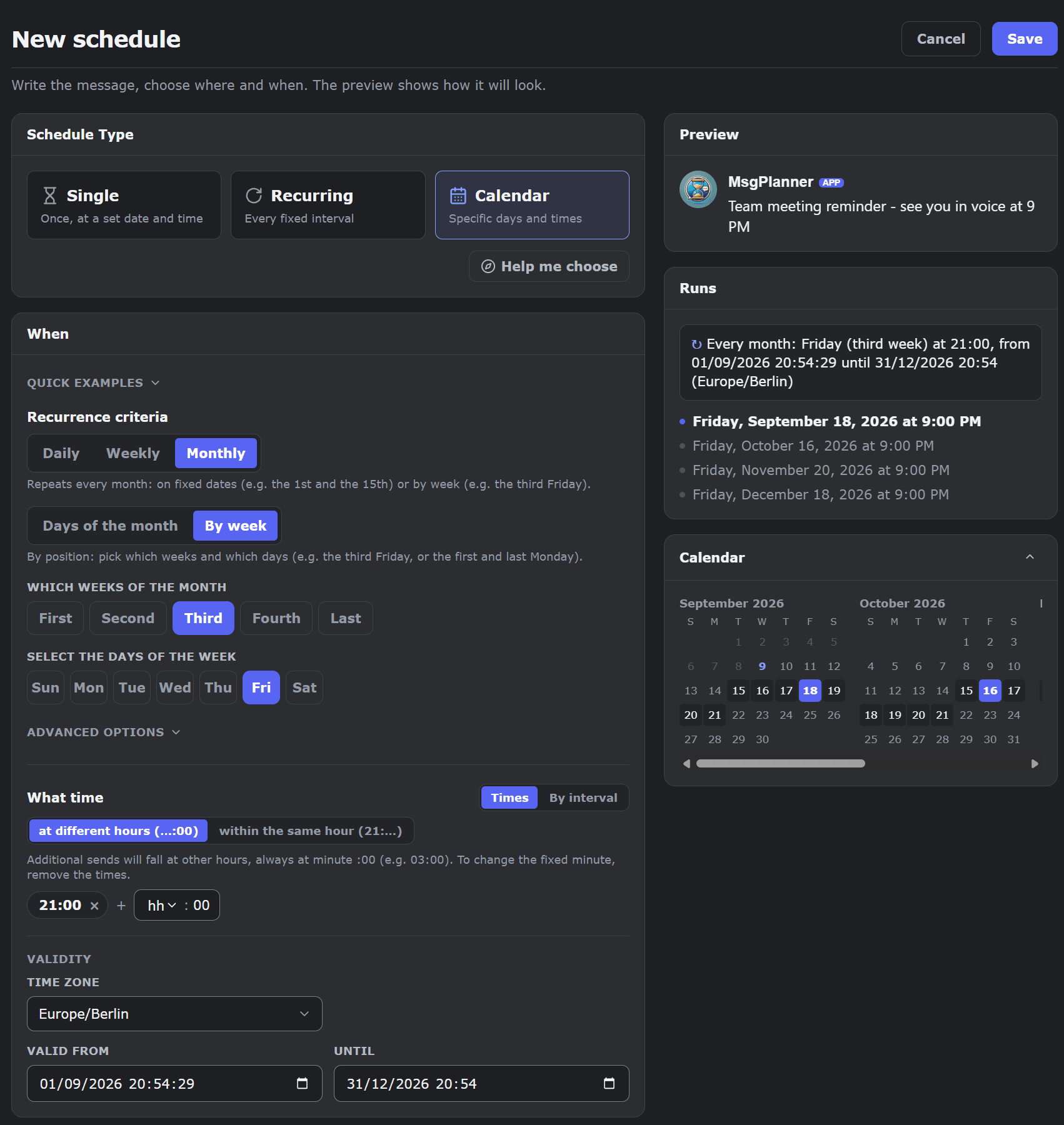
The schedule that replaces itself. Enable the “keep latest” cleanup option and every new schedule post automatically deletes the previous one. Your channel always shows exactly one, current schedule — no stale posts to clean up, no pinned-message archaeology.
Timezones handled for you. Schedules run in the timezone you set for the server. Daylight saving shifts are managed automatically — the Monday 9:00 post stays at 9:00.
Setting it up takes a couple of minutes: invite the bot, open the dashboard, write the message, pick the rhythm. The calendar scheduling guide walks through every option.
Looking for a Discord calendar bot?
If you searched for a “calendar bot”, the calendar mode above is that: a bot that understands weekdays, weeks of the month, specific dates and end dates — and posts messages accordingly. The difference from an events-style calendar bot is where the result lives: instead of a side widget, your schedule lands in the channels your members actually read, as normal messages you fully control (text, embeds, images, mentions).
Syncing Google Calendar or other external calendars
To be upfront: MsgPlanner does not two-way sync with Google Calendar or iCal feeds. If what you need is “my Google Calendar events mirrored as Discord events”, you want a dedicated calendar-sync tool — that’s a different job. Where MsgPlanner fits is the publishing half: turning your schedule into timely, automatic posts your community sees. Many servers use both: a sync tool for RSVP-style events, MsgPlanner for the recurring announcements around them.
FAQ
Can you integrate a schedule into Discord?
Yes — with a bot. Discord has no built-in scheduler for messages, but a scheduling bot like MsgPlanner posts your schedule automatically: one-off, recurring at an interval, or calendar-based (weekdays, weeks of the month, specific dates).
Does Discord have a built-in message scheduler?
No. Discord Events cover single occasions with RSVPs, but there is no built-in way to schedule or repeat a message. That’s what scheduling bots are for.
How do I post a recurring schedule in Discord?
Invite MsgPlanner, open the web dashboard, write your message and choose a rhythm — “every Monday 9:00”, “every third Friday”, “the 1st of each month”. The bot posts it in your server’s timezone, and can replace the previous post automatically so only the current schedule stays visible.
Is it free?
Yes — the free plan lets you run scheduled and recurring posts with no time limit. Larger setups (more schedules, longer messages, unlimited repetitions) are covered by the Elite plan, with a 14-day free trial.